


Create a business profile
Create a Services business profile in the VietLinker App
Introduce your services on VietLinker, from a nail salon to a professional practice. Follow the guide to add details, get AI help with the description, set hours and submit your profile for review.
Which platform are you using?
For the VietLinker mobile app. If you use a browser, choose Website above.
Visual walkthrough
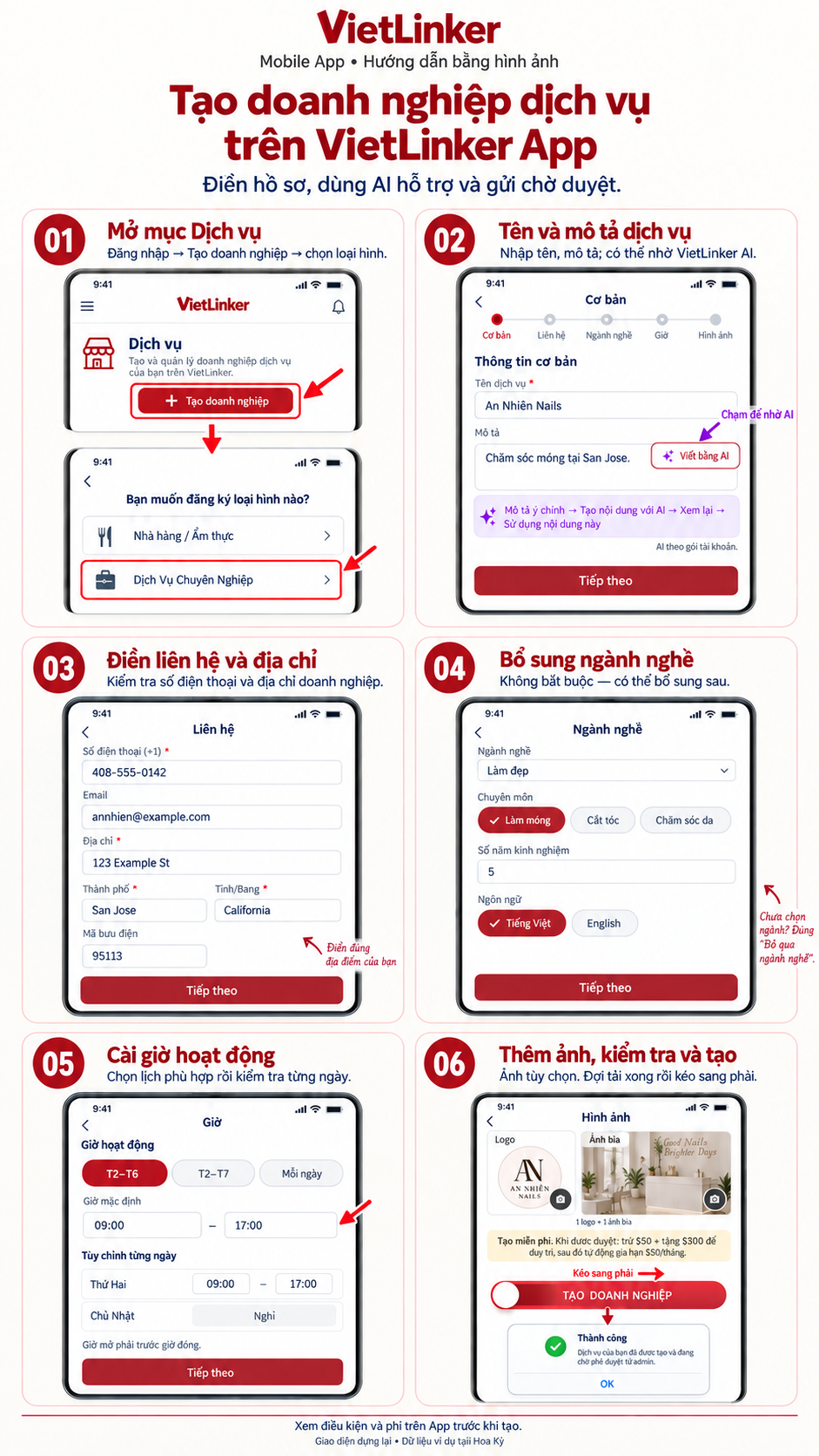
Step-by-step instructions
Open Services
Sign in to the app, open Services (Dịch vụ) and choose Create business (Tạo doanh nghiệp). Select Professional Services (Dịch Vụ Chuyên Nghiệp) to open the service business form.
Enter the service name and description
Fill in the service name and description. The illustration uses a fictional An Nhiên nail salon. You can use Write with AI (Viết bằng AI) if your account has access. Review the text and select Next (Tiếp theo).
Add contact information and address
Enter the phone number and business address. For the US market, the app requires an address, city and state; complete the fields marked as required. Add an email, website and postal code if available.
Add industry details
Choose the appropriate industry, such as Beauty, then a relevant specialty such as Nail care. Add experience, languages or other industry details when relevant. If no industry is selected, you can choose Skip industry (Bỏ qua ngành nghề) and add it later.
Set business hours
Choose a Monday–Friday, Monday–Saturday or every-day preset if suitable, then check each day’s opening and closing times. Mark closed days. Select Next to continue to photos.
Add photos, review and create
Add a logo and cover photo if available, and wait for uploads to finish. Review the details and fee notice, then drag Create business (Tạo doanh nghiệp) to the right. When the Success alert appears, choose OK to open business management. Your new profile still requires review.

