


Create a business profile
Create a Restaurant profile in the VietLinker App
Add your restaurant or eatery to VietLinker. Follow the illustrated steps to enter its name, description, contact details, hours and photos, then submit the profile for review.
Which platform are you using?
For the VietLinker mobile app. If you use a browser, choose Website above.
Visual walkthrough
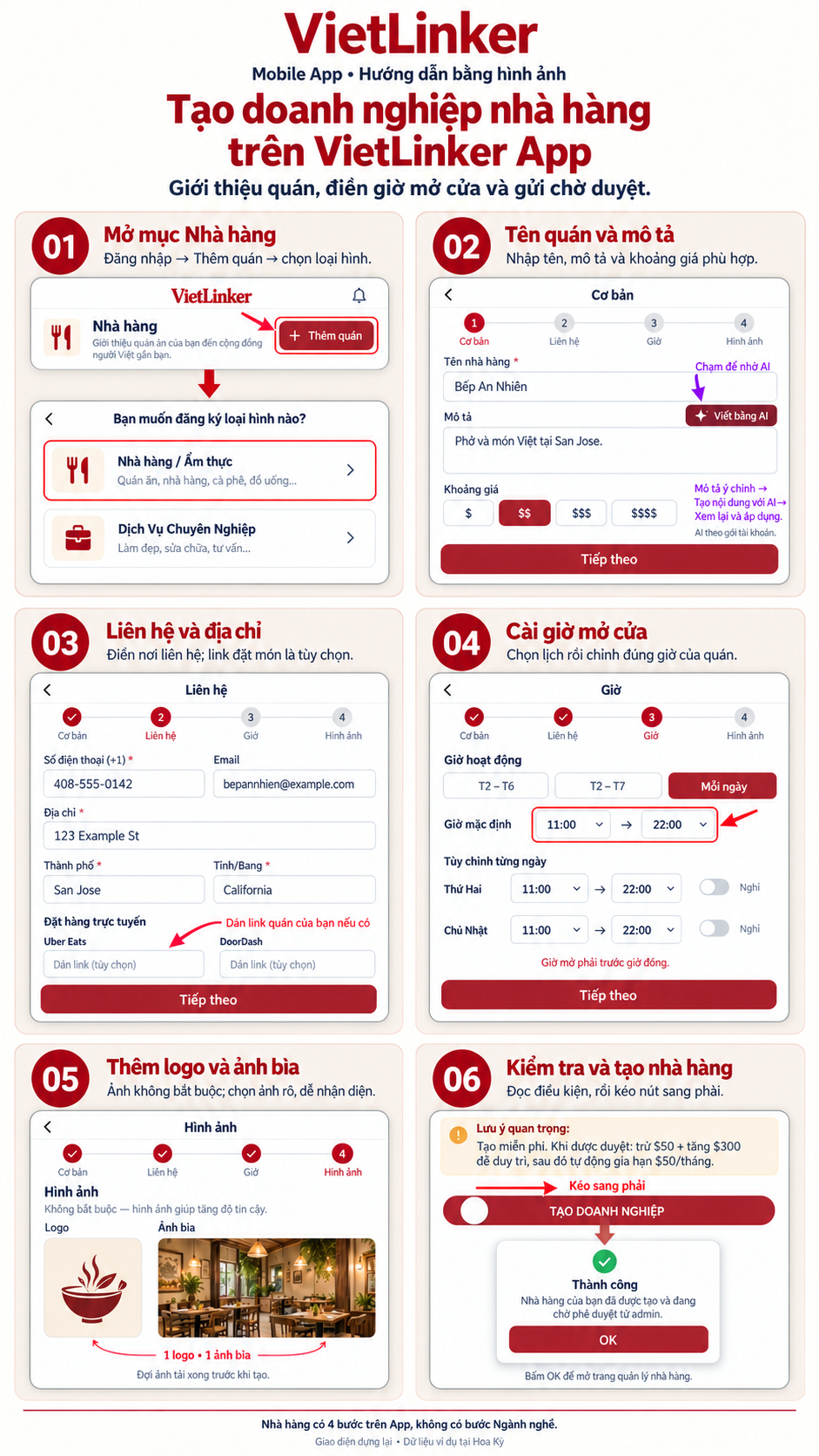
Step-by-step instructions
Open Restaurants
Sign in, open Restaurants (Nhà hàng) and choose Add restaurant (Thêm quán). Select Restaurant / Food (Nhà hàng / Ẩm thực) to open the form for your restaurant or eatery.
Enter the restaurant name and description
Enter the name and describe your main dishes and what makes the restaurant distinctive. You can use Write with AI if your account has access, then review the text. Select a suitable price range from $ to $$$$ and choose Next.
Add contact information and address
Enter a phone number and the address customers can visit. Check the city, region and fields required for the selected market. Add an email, website and postal code if available. If the restaurant has Uber Eats or DoorDash pages, enter the correct store links.
Set opening hours
Choose a suitable schedule preset, then check opening and closing times for each day. Mark the days when the restaurant is closed. The Restaurant flow goes directly to hours and does not include the Services industry step.
Add a logo and cover photo
Select a logo and cover photo if available. Use clear photos that accurately represent the restaurant and wait for uploads to finish. Check the selected images before submitting.
Review and create the restaurant
Check the name, description, phone, address, hours and photos. Read the fee notice and drag Create business (Tạo doanh nghiệp) to the right. When the Success alert appears, choose OK to open restaurant management. The new profile awaits review.

