


Posting guide
How to post real estate in the VietLinker App
An illustrated guide to listing a property for sale or rent, including VietLinker AI assistance for the title and description.
Which platform are you using?
For the VietLinker mobile app. Scroll through the main information, location and contact, and additional details before sliding to post.
Follow the illustrated guide
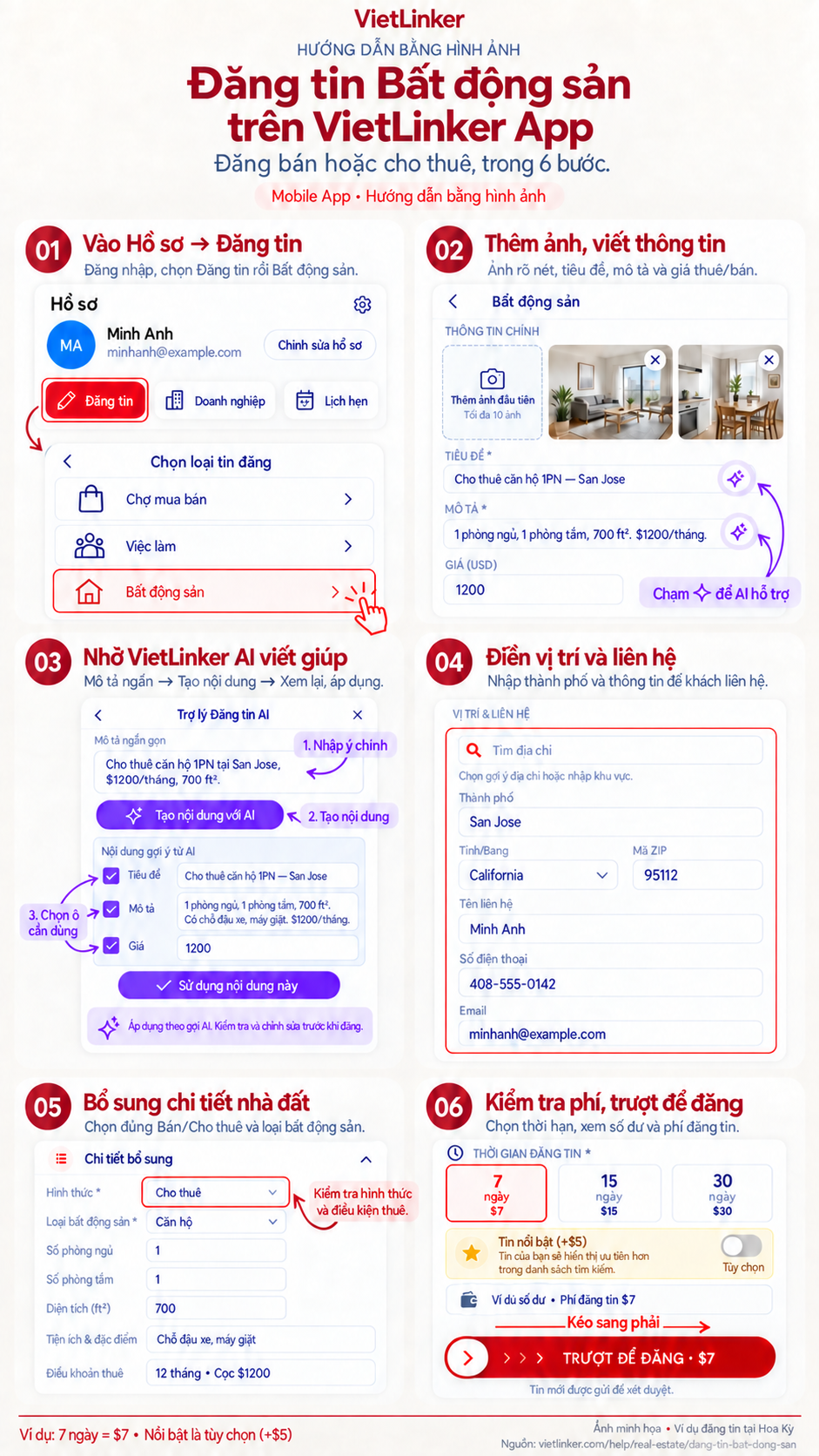
Step-by-step instructions
Open your profile and choose Real estate
Sign in to the app, open your profile and select Post. Choose Real estate on the listing-type screen to open the property form.
Add photos, title, description and price
Add up to 10 real photos of the property in the main information section. Enter the title, description and price. For rentals, state the billing period in the description; for example, a one-bedroom apartment at 1,200 USD per month.
Use VietLinker AI for writing help
Tap the sparkle beside Title or Description, enter the actual property details, then generate content. Review the result, select the fields you want to fill, and apply it.
Add location and contact details
Enter the address, select the matching suggestion, and check the city, state and ZIP code. City is required for a new listing. Add the contact name, phone or email people can use to arrange a viewing.
Choose the listing type and property details
Scroll to Additional details. Choose sale or rental and the property type, then add bedrooms, bathrooms, area and amenities. Rental listings also have lease terms. Check the area unit for your selected market.
Review the fee and slide to post
Choose 7, 15 or 30 days and enable featured placement if wanted. Check the property information, total and wallet balance, then drag Slide to post from left to right.
Check before posting
United States example: 7 days costs $7, 15 days costs $15, and 30 days costs $30. Featured placement is optional and adds $5. Check the total and your wallet balance before confirming; select featured placement only if you want it.
After submitting, track the listing status in your account. Listings are reviewed before appearing publicly. If an error appears, read the message and correct the information requested.
How to track, edit and delete posts
